
Asepsis
a smart solution for .DS_Store pollution
a feature of TotalFinder</div>.
About
Asepsis prevents creation of .DS_Store files. It redirects their creation into a special folder.
Why is .DS_Store a problem?
Well, it is not really a problem for most Mac users because .DS_Store files are normally hidden in Finder.
But I’m a developer and I run Finder with TotalFinder and I have enabled display of hidden files. Also I run a lot of command-line tools via terminal. The problem is that sometimes .DS_Store files get into a way. I hate when my clean new folders get polluted by those small tiny files holding unimportant garbage. I hate when I zip a folder using some unix command and it includes .DS_Store files in the archive. I hate when I visit a network volume and that pollutes its content with those nasty files. To put it simply I don’t want my geeky Windows friends to laugh at me because this makes me look incompetent.
That is why I decided to solve this for myself and I’m sharing my solution with other Mac geeks out there to help them protect their egos :-)
Asepsis does .DS_Store redirection. How does it work technically?
Apple implemented a private system framework DesktopServicesPriv which is responsible for creating and manipulating .DS_Store files. This framework is used mainly by Finder, but there are also other system apps which link against it and may use it (yes mdworker I’m looking at you!). DesktopServicesPriv uses standard libc calls to manipulate .DS_Store files.
At core Asepsis provides a dynamic library DesktopServicesPrivWrapper which gets loaded into every process linking against DesktopServicesPriv.framework. It interposes some libc calls used by DesktopServicesPriv to access .DS_Store files. Interposed functions detect paths talking about .DS_Store files and redirect them into a special prefix folder. This seems to be transparent to DesktopServicesPriv.
Additionally Asepsis implements a system-wide daemon asepsisd whose purpose is to monitor system-wide folder renames (or deletes) and mirror those operations in the prefix folder. This is probably the best we can do. This way you don’t lose your settings after renaming folders because rename is also executed on folder structure in the prefix directory.
The prefix folder is /usr/local/.dscage
DesktopServicesPrivWrapper- a proxy library for interposing file manipulation calls in DesktopServicesPrivasepsisd- a system-wide daemon for mirroring folder renames and deletes in the prefix folderasepsisctl- a command-line utility for controlling Asepsis operation
Installation
To install the software:
- Run the installer
- Restart your computer
After reboot .DS_Store files are no longer created when you open Finder and browse folders (in case .DS_Store files are not already present there).
Troubleshooting
In Terminal.app run:
asepsisctl diagnose
Updates
Asepsis checks for update after every reboot using Sparkle framework. It also checks its consistencty at that point.
Uninstallation
Just run provided uninstaller from the DMG archive or in Terminal execute:
asepsisctl uninstall
sudo reboot
Alternatively you may use uinstaller which comes with the DMG archive. It launches asepsisctl uninstall for you.
Installing from sources
You may want to review the source code and install it by compiling it from sources. Please follow instructions in GitHub repository.
Control
You may control asepsis operation via asepsisctl
During the installation asepsisctl tool is symlinked into /usr/local/bin, so it should be visible from the command-line.
> asepsisctl --help
The control script for asepsis operations.

Usage:
    asepsisctl [command] [options]

Commands:
    disable                          Disables asepsis.
    enable                           Enables asepsis.
    diagnose                         Diagnoses asepsis setup.

Helper commands:
    neton                            Enables DS_Store files on network volumes.
    netoff                           Disables ... (http://support.apple.com/kb/ht1629).
    migratein [root]                 Migrates .DS_Store files located within [root] into -> /usr/local/.dscage. (Cleanup)
    migrateout [root]                Migrates .DS_Store files originally within [root] back from <- /usr/local/.dscage. (Restore)
    prune                            Removes empty directories from /usr/local/.dscage.
    reset                            Deletes all content from /usr/local/.dscage.

Installation commands:
    install                          Performs reinstallation (using "/Users/darwin/root/asepsis").
    uninstall                        Performs complete uninstallation.
    install_wrapper                  Installs DesktopServicesPriv.framework wrapper.
    uninstall_wrapper                Uninstalls DesktopServicesPriv.framework wrapper.
    remove_symlink                   Removes asepsisctl symlink from /usr/local/bin.
    create_symlink                   Creates asepsisctl symlink in /usr/local/bin.
    make_dscage                      Makes sure /usr/local/.dscage exists with sufficient rights.
    kill_daemon                      Stops asepsis daemon.
    uninstall_daemon                 Uninstalls asepsis daemon.
    install_daemon                   Installs asepsis daemon.
    launch_daemon                    Launches asepsis daemon.
    enable_warnings                  Enables warnings caused by mach_override (vm.shared_region_unnest_logging)
    disable_warnings                 Disables warnings caused by mach_override (vm.shared_region_unnest_logging)
    uninstall_updater                Uninstalls asepsis updater.
    install_updater                  Installs asepsis updater.

Backward compatibility:
    uninstall_dylib                  Removes libAsepsis.dylib from /etc/launchd.conf.
    uninstall_kext                   Removes /System/Library/Asepsis.kext during next boot.

Where options are:
    -r, --root /Users/darwin         Root folder for migration
    -d, --[no-]dry                   Run migration in dry mode
    -v, --[no-]verbose               Be more verbose
    -f, --[no-]force                 Force operation
    -n, --[no-]nosudo                Don't apply sudo
    -p, --[no-]panic                 Panic mode
    -h, --help                       Show this message
    -V, --version                    Print version
Diagnose
Asepsis modifies system files in /System/Library/PrivateFrameworks/DesktopServicesPriv.framework.
As you can guess there is a clear risk that during system update Apple reverts files to the originals. This should be no big deal. Asepsis checks for this at every reboot and reports it. Reinstalling asepsis should patch it back. In the worst case you will notice that you have .DS_Store files creeping back in the house.
To diagnose asepsis run:
asepsisctl diagnose
Here is the script source: https://github.com/binaryage/asepsis/blob/master/ctl/cmd/diagnose.rb
To reinstall DesktopServicesPriv wrapper run:
asepsisctl uninstall_wrapper
asepsisctl install_wrapper
Here is the script source: https://github.com/binaryage/asepsis/blob/master/ctl/cmd/install_wrapper.rb
Under Mavericks some users reported that system restart is required after successfully running install_wrapper. You should do that to be sure all processes link against patched DesktopServicesPriv.
Known issues
- when copying folders, DS_Store settings are not copied over (daemon is unable to distinguish this class of file operations)
Please report any issues.
FAQ
Sounds scary. Is this safe?
Well uhmmm, use it at your own risk :-) It sounds scary but it should be pretty lightweight solution. You should review the code to understand what it does.
Does it work with OS X 10.11 (El Capitan) ?
No with default configuration, see this page for more info.
Does it work with OS X 10.10 (Yosemite) ?
Yes, use the latest version.
Does it work with OS X 10.9 (Mavericks) ?
Yes, use the latest version.
Does it work with OS X 10.8 (Mountain Lion) ?
Yes, use the latest version.
Does it work with OS X 10.7 (Lion) ?
No. Last version supporting Lion is Asepsis 1.4.1.
Does it work with OS X 10.6 (Snow Leopard) ?
No.
What if .DS_Store file is already present in a folder?
Asepsis will use it. It won’t redirect it in this case. This way Asepsis works seamlessly with DMG archives or folders you browse on a network. If you delete the .DS_Store file, next time it will be created in the prefix folder. This is pretty simple approach how to adopt Asepsis incrementally on folder-by-folder basis.
How could I migrate existing .DS_Store files?
Please see
asepsisctl migrateincommand
Are there any processes which don’t work well with Asepsis?
Asepsis has white-list of processes known to manipulate with .DS_Store files. Right now it is effective for Finder.app and mdwrite process.
What about using resource forks for hiding .DS_Store files?
Nice idea! This would be probably a more elegant approach but it would work only for HFS+ volumes. I haven’t tried to implement it via resource forks. I decided to run with this prefix-folder approach which seemed to me as a more predictable approach. Feel free to fork and experiment.
How can I keep Asepsis up-to-date?
Asepsis is using Sparkle updater. You should be prompted when a new version comes out. Asepsis checks for new version after every reboot.
Does Asepsis install some kernel extension?
Since version 1.3 Asepsis does not use kernel extension anymore.
Panic mode!
My system doesn’t boot up. What now?
- restart computer into single-user mode
- follow instructions on the screen to mount your filesystem for writing (something like
/sbin/mount -uw /) - execute
/Library/Application\ Support/Asepsis/ctl/asepsisctl uninstall_wrapper --nosudo reboot
Note: in step 3, the path might be different if you boot from external disk, for example /Volumes/YourStartupVolume/Library/Application\ Support/Asepsis/ctl/asepsisctl
It this didn’t work for you for some reason. You have a backup folder with original DesktopServicesPriv.framework version on your disk. Contact me at support@binaryage.com and I will give you special instructions.
SIP
System Integrity Protection
Starting with macOS 10.11 (El Capitan), Asepsis cannot run on a normally configured machine due to System Integrity Protection.
System Integrity Protection (SIP) is a new security feature introduced by Apple. That’s good, but unfortunately it prevents Asepsis from altering DesktopServicesPriv framework. This article will tell you how to configure your machine, so that you can use Asepsis. Before you do this, it is important to get informed about what System Integrity Protection is, and what it means to turn it off. Technical details are well covered in SIP review on Ars Technica. Apple also provided some information here.
 Do you really depend on Asepsis so much that you want to possibly lower your system security?
Frankly, I'm going to stop Asepsis development and won't support Asepsis users anymore under El Capitan and later.
Do you really depend on Asepsis so much that you want to possibly lower your system security?
Frankly, I'm going to stop Asepsis development and won't support Asepsis users anymore under El Capitan and later.
Anyways, if you decide to modify the setting under El Capitan, you will be able to install and run Asepsis as before. Just to be clear…
How to modify System Integrity Protection
You must boot into the Recovery OS. You do this by restarting your machine, and holding COMMAND + R until the Apple logo appears.
Then select Terminal from the Utilities menu. It looks like this:
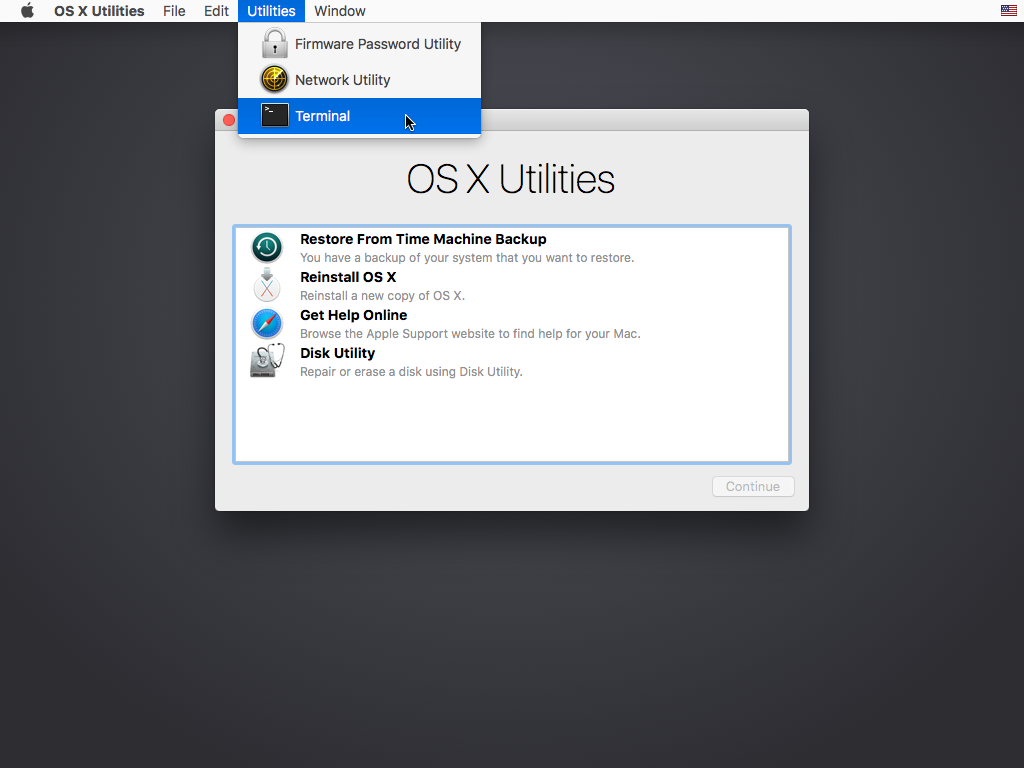
In the window that opens, type csrutil disable and press return.
This turns off the part of SIP that Asepsis needs to run, and OS X complains that it is an unsupported configuration.
Now type reboot and press return to restart your machine.
After restart create file in your home directory to allow installer to ignore system version checks:
touch ~/.no-asepsis-os-restriction
Then you may install the latest version of Asepsis.
You can find some further information in our blog.
